
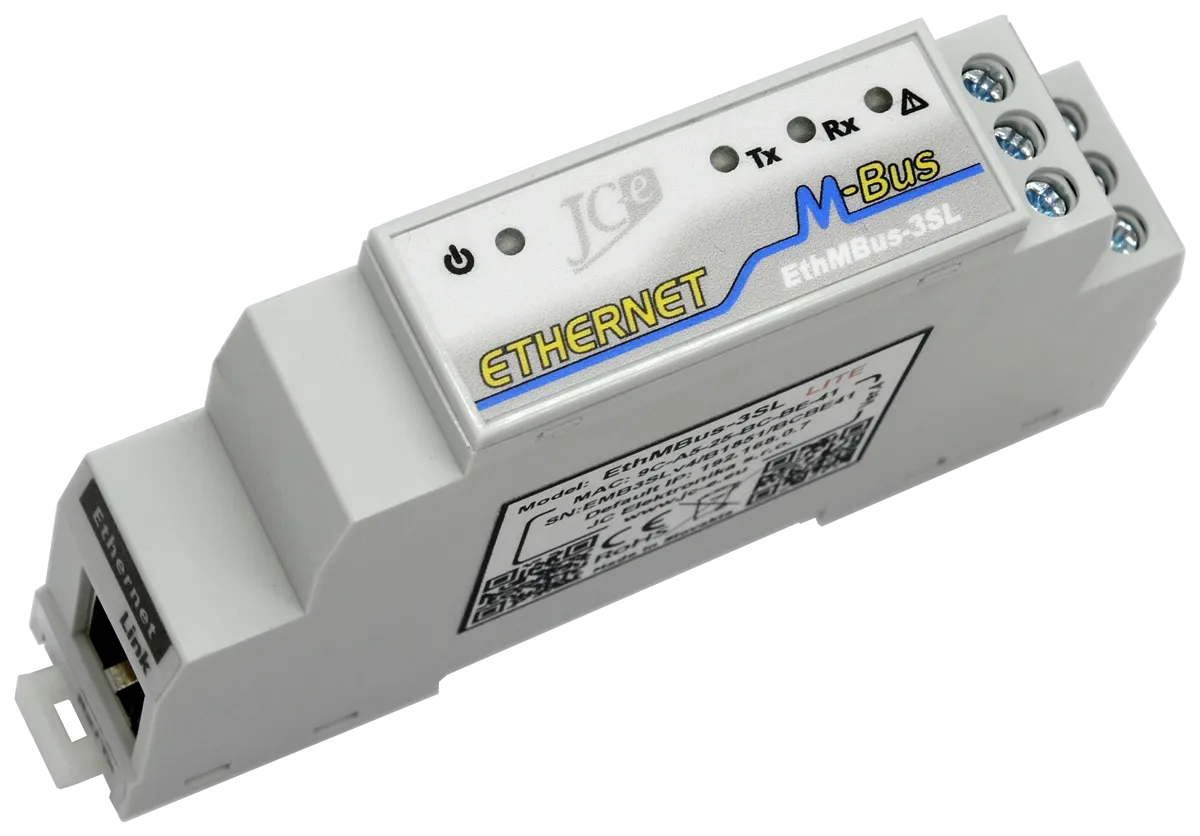
EthMBus-3SL LITE
Ethernet to M-Bus communication converter
Basic Ethernet converter
Designed for remote communication with M-Bus meters using the Ethernet computer network in building or home automation and similar applications.
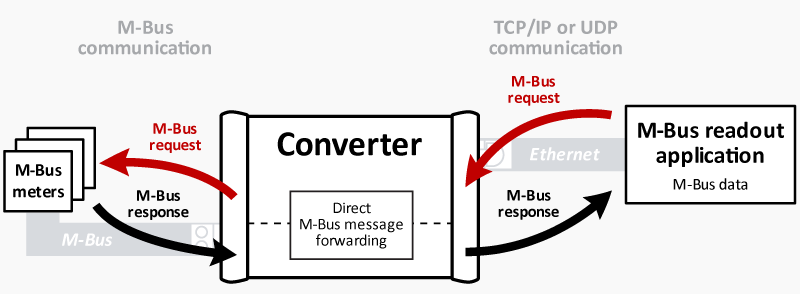
The converter works only as a transparent gateway for transfer of M-Bus messages using TCP or UDP Ethernet protocols. Data is available only through M-Bus protocol readout. Data is available only through M-Bus protocol readout.
Main characteristics
M-Bus port
- Connection of 1 to 3 M-Bus slave devices.
The most commonly used devices are heat, water, gas and electricity consumption meters. - Surge protection with standard level of protection against overvoltage.
- Current protection against overload and short circuit on the communication line
with LED status indication.
Power supply
- Wide power supply operating ranges of 8,5-36V DC and 8-26V AC (converter version 4 and higher).
- Overvoltage protection.
- LED power supply indication.
Ethernet
- TCP, UDP protocols and virtual COM port software.
- 10/100BASE-TX ethernet port, RJ45 connector.
Mechanical construction
- Plastic box with mounting on 35 mm DIN rail.
Main software characteristics
Transparent gateway mode:
- TCP/IP connection in server mode – option for multiple simultaneous connections.
- TCP/IP connection in client mode.
- UDP connection in single or multiple clients mode.
Software functions
- Converter configuration through web interface.
- TCP and UDP communication in server and client modes.
Main differences from the EthMBus-3SL SMART converter
- No SMART functions for independent readout, processing and export of M-Bus data.
- Lower power consumption.
- Support for multiple connections in TCP/IP server mode.
- Doesn’t provide Telnet interface for configuration.
- Doesn’t provide logging of Ethernet activity and error states.
- No options for backup IP addresses for establishing TCP/IP connection.
Guarantee of quality
- Each converter passes through several functional electrical tests during the production.
Additionally a communication test is performed after final assembly. - EMC certification in an accredited laboratory for industrial environment.
- Solid design and construction based on many years practical experience.
| Ethernet communications interface | |
|---|---|
| Communications interface | 10BASE-T or 100BASE-TX (auto-sensing) |
| Communication protocols | ARP, UDP, TCP, ICMP, AutoIP, DHCP, HTTP |
| Connector | RJ45 |
| Compatibility | Ethernet: Version 2.0/IEEE 802.3 |
| M-Bus Master communication interface | |
| Number devices that can be connected | 1 to 3 SLAVE devices, idle current max. 4.5mA |
| Baud rate | 300 – 9600 bps |
| Protection | – overvoltage protection TVS 400W |
| – electronic protection against overloads and short circuit on the communication line | |
| note: converter can withstand temporary short circuit on the communication line | |
| Galvanic separation | up to 1kV from power supply, more than 1kV from Ethernet |
| Connector | terminals for wires of up to 2.5mm² cross-section area |
| Power supply | |
| Recommended range of power supply voltages, note: applies to converter version 4 and higher. | |
| DC power supply | 8.5V to 36V |
| AC power supply | 8V to 26V |
| Maximum limits of supply voltage – permanent operation at these voltages is not recommended | |
| Minimum power | 8V DC, 7.5V AC |
| Maximum power | 39V DC, 27V AC |
| Protection | overvoltage protection TVS 400W |
| Power consumption | 1.2W to 1.9W. Depends on M-Bus line load and communication. |
| Maximum consumption during M-Bus line short is 2.9W. | |
| Connector | terminals for wires of up to 2.5mm² cross-section area |
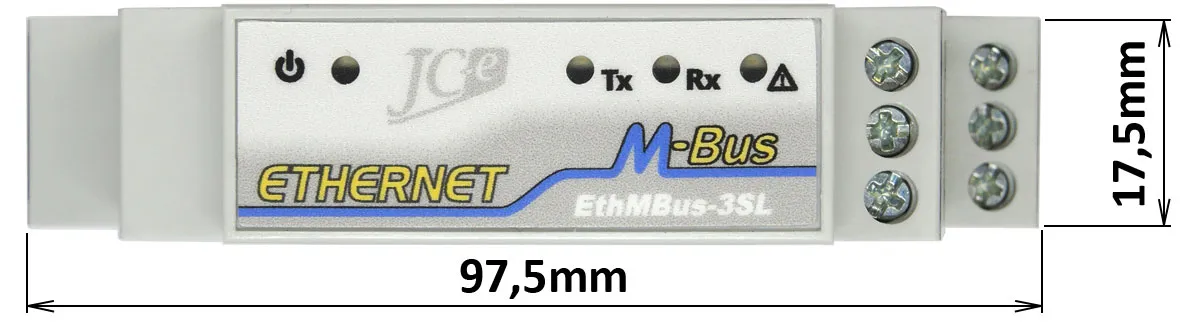
| Status LEDs | |
| Power – blue | indication of connected supply voltage |
| Transmit – green | indication of data transmission on the M-Bus line |
| Receive/Overload – yellow | indication of data reception on the M-Bus line – LED is flashing |
| indication of M-Bus line overload – LED stays on (idle current > 7.5mA) | |
| Short – red | indication of short on the M-Bus line – turned on (resistance of the line < 1kΩ) |
| Temperature | |
| Operating range | 0°C to 45°C |
| Mechanická konštrukcia | |
| Mechanical design | plastic box |
| Mounting | 35 mm DIN rail (EN 50022 top hat rail) |
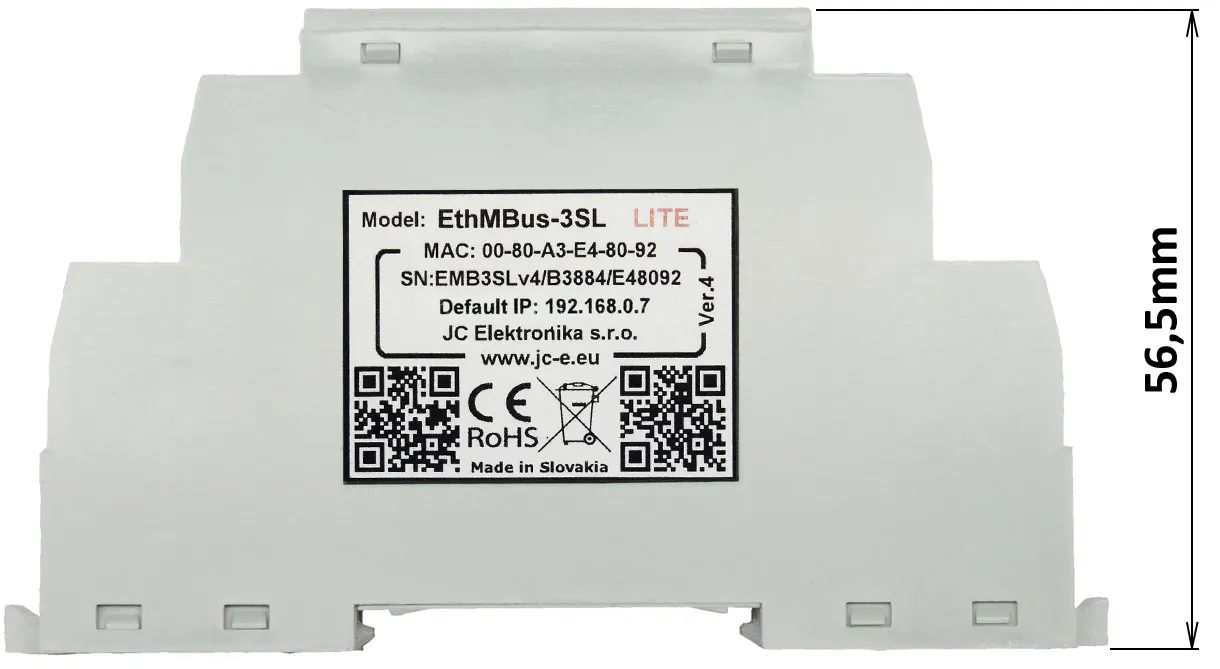
| Dimensions: height x width x length | 56.5 x 17.5 x 97.5mm |
| Protection classification | IP20 |
| Weight | 52g |
EMC compatibility of the M-Bus converter has been tested according to the following standards for IT environments.
| EMC emission tests | ||
|---|---|---|
| Standard | Test | Level |
| EN 55022 | Power line – CONDUCTED EMISSIONS 10/150 kHz – 30 MHz | Class B |
| EN 55022 | RADIATED EMISSIONS (Electric Field) 30 MHz – 1000 MHz | Class B |
| EMC immunity tests | ||
|---|---|---|
| Standard | Test | Level |
| EN 61000-4-2 | ELECTROSTATIC DISCHARGE (ESD) – Contact discharge | ± 4 kV |
| EN 61000-4-2 | ELECTROSTATIC DISCHARGE (ESD) – Air discharge | ± 8 kV |
| EN 61000-4-4 | ELECTRICAL FAST TRANSIENT/BURST – Power line | ± 4 kV |
| EN 61000-4-4 | ELECTRICAL FAST TRANSIENT/BURST – M-Bus line | ± 4 kV |
| EN 61000-4-5 | SURGE IMMUNITY – Power line. Common/differential mode. | ± 1 kV / ± 0,5 kV |
| EN 61000-4-5 | SURGE IMMUNITY – M-Bus line. Cable shielding. | ± 4 kV |
| EN 61000-4-5 | SURGE IMMUNITY – M-Bus line. Common/differential mode.* | ± 1 kV / ± 0,5 kV |
| EN 61000-4-6 | CONDUCTED DISTURBANCES, INDUCED BY RADIO-FREQUENCY FIELDS 0.15MHz – 80 MHZ. Power line and M-Bus line. | 3 V |
* test carried out at the request of the manufacturer. The M-Bus port has an increased durability against overvoltage. Carrying out this type of test is not required with the use of shield cable.
End user
Price list for individuals and companies which do not buy converters for resale.
Integrator
Price list for companies which buy converters for the purpose of resale to their custommers as manufacturers or suppliers.
The price list is available only to registered business partners.
Registration request.
Leaflet
Manuals
Lantronix utilities
Application that can be used to create a virtual serial port - USR-VCOM
Warning: The USR-VCOM application doesn’t work with SMART converters. Those use a different application to provide this type of functionality.
Legacy manuals for old converters
Manual (applies to converter versions 1, 2, 3)
Contents
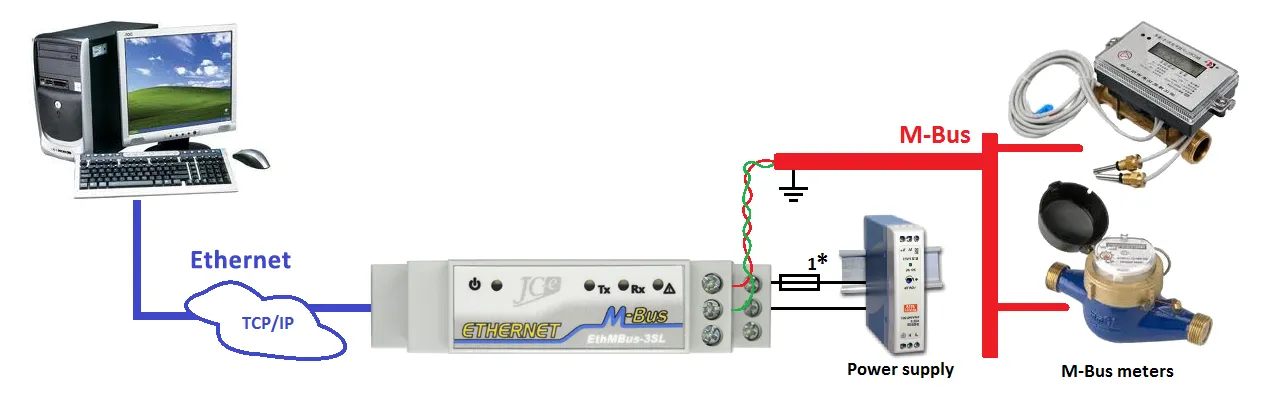
Typical application
Typical wiring of the converter with M-Bus devices, power supply and Ethernet network connection to a computer.
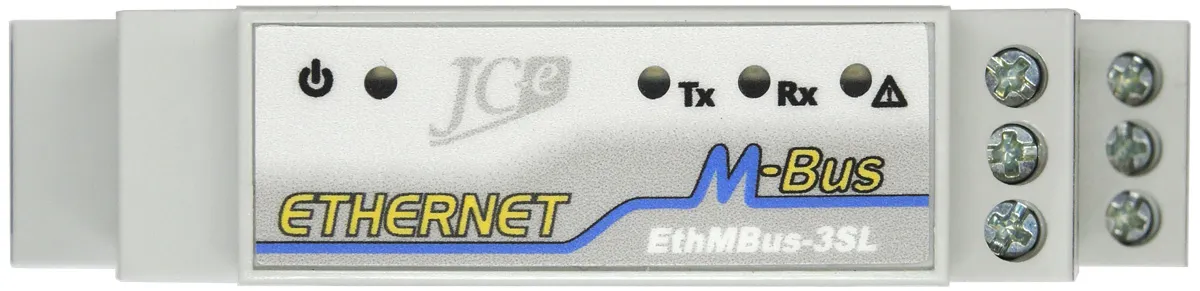
LED indication
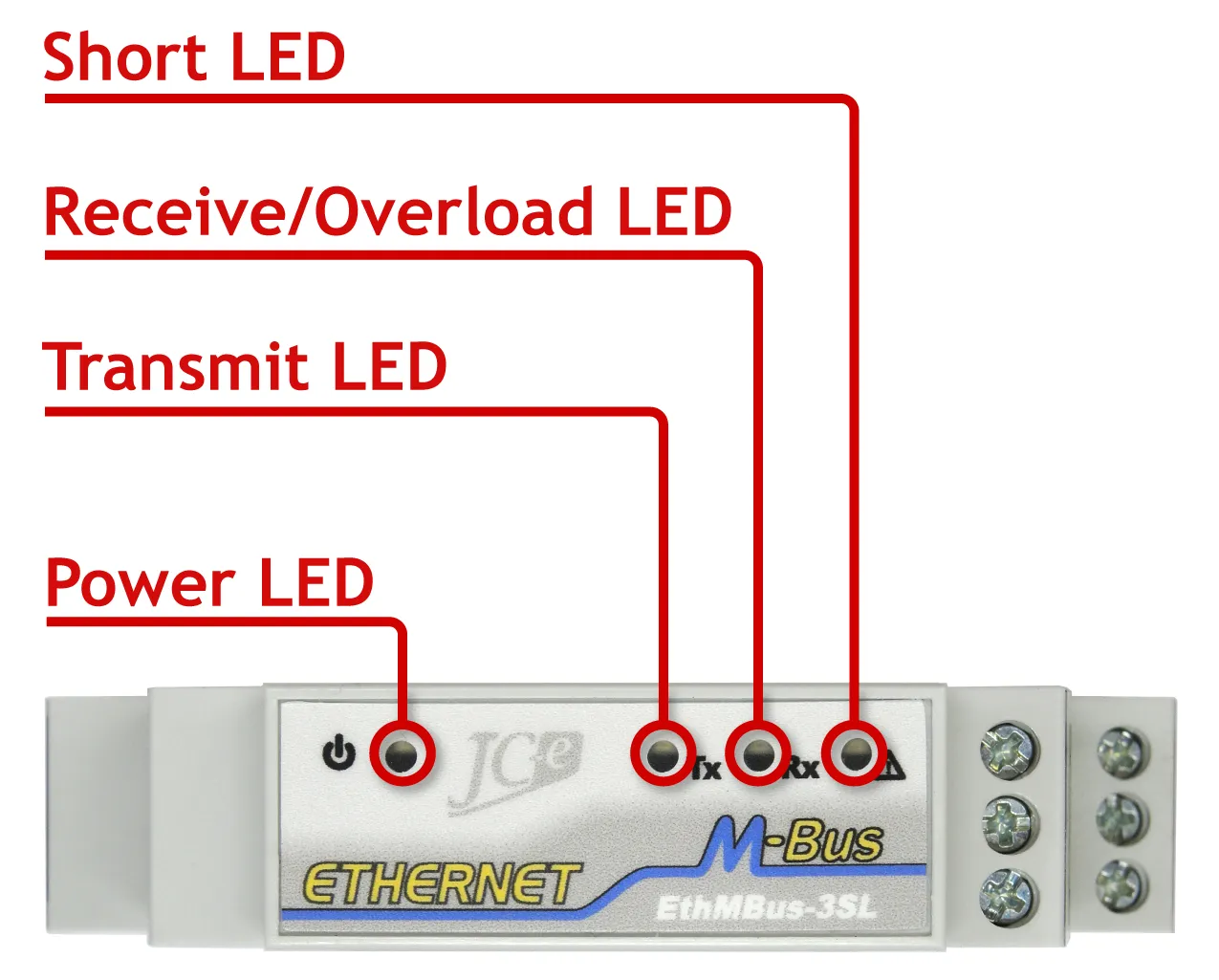
| Status LEDs | Color | |
|---|---|---|
| Power | Indication of connected supply voltage. | blue |
| Transmit | Indication of data transmission on the M-Bus line. | green |
| Receive/Overload | Indication of data reception and overload on the M-Bus line | yellow |
| – indication of data reception on the M-Bus line – LED is flashing | ||
| – indication of M-Bus line overload – LED stays on (idle current > 7.5mA) | ||
| Short | Indication of a short on the M-Bus line – LED turned on (resistance of line < 1kΩ). | red |
Connectors on the M-Bus side
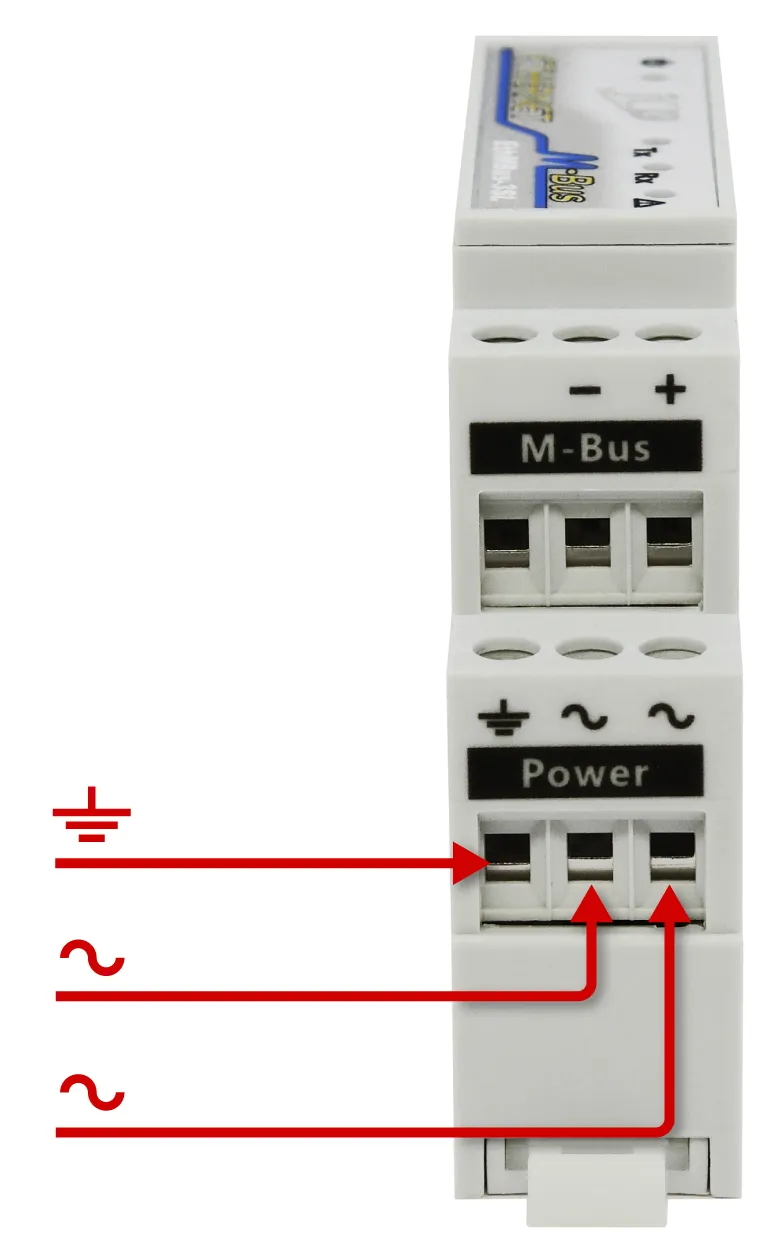
| Connector | Type | |
|---|---|---|
| M-Bus | Connector for the M-Bus line. | built-in |
| Power | Connector for power supply. | built-in |
| ∿ | Power supply terminal. | |
| ∿ | Power supply terminal. | |
| ⏚ | Earth ground terminal. | |
Connectors on the Ethernet side
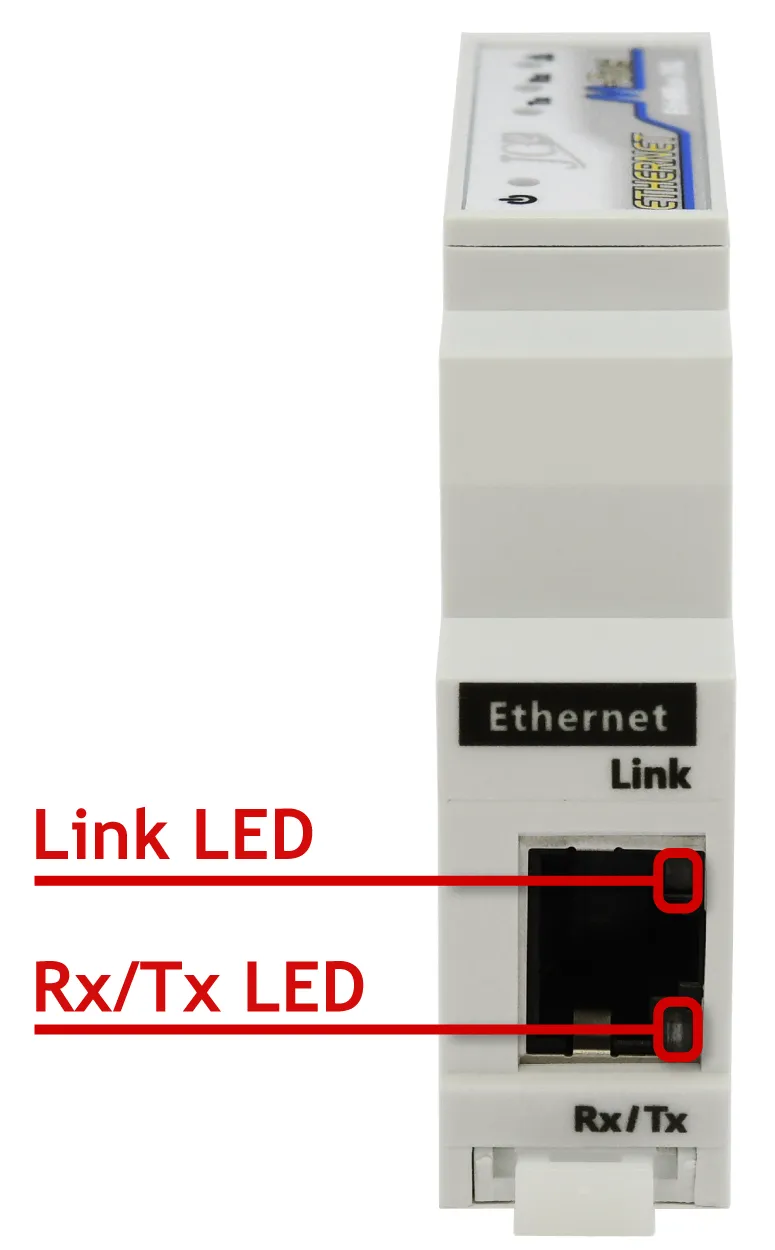
| Connector | Type | |
|---|---|---|
| Ethernet RJ45 | Connector for Ethernet. | RJ45 |
| Status LEDs | Color | |
| Link | Ethernet network connection status. The LED is turned off when connection is unavailable. The LED is turned on when connection is available. | green |
| Rx/Tx | Communication activity. The LED is turned on only during network communication. | yellow |
Obsah
Doporučené zapojenie
Doporučené zapojenie prevodníka s M-Bus zariadeniami, napájacím zdrojom a pripojením k počítaču prostredníctvom siete Ethernet.
LED indikácia
| Indikačné LED diódy | Farba | |
|---|---|---|
| Power | Indikácia pripojeného napájacieho napätia. | modrá |
| Transmit | Indikácia vysielania dát na M-Bus linke. | zelená |
| Receive/Overload | Indikácia príjmu dát a preťaženia M-Bus linky. | žltá |
| – indikácia príjmu dát na M-Bus linke – LED bliká | ||
| – indikácia preťaženia M-Bus linky – LED svieti (kľudový prúd > 7,5mA) | ||
| Short | Indikácia skratu na M-Bus linke – svieti (R linky < 1kΩ). | červená |
Konektory časť M-Bus
| Konektor | Typ | |
|---|---|---|
| M-Bus | Konektor pre pripojenie M-Bus linky. | vstavaný |
| Power | Konektor pre pripojenie napájacieho napätia. | vstavaný |
| ∿ | Pól napájacieho napätia. | |
| ∿ | Pól napájacieho napätia. | |
| ⏚ | Uzemnenie. | |
Konektory časť Ethernetu
| Konektor | Typ | |
|---|---|---|
| Ethernet RJ45 | Konektor pre pripojenie Ethernetového kábla. | RJ45 |
| Indikačné LED diódy | Farba | |
| Link | Stav pripojenia do ethernetovej siete. LED dióda nesvieti v prípade nedostupného pripojenia, svieti ak je pripojenie aktívne. | zelená |
| Rx/Tx | Komunikačná aktivita. LED dióda zasvieti len pri sieťovej komunikácii. | žltá |